
Tips specific to Social Networking Sites
The internet is like a city, it has its nice neighborhoods, entertainment districts, and dangerous areas that everyone wants to avoid. And although we try to stay in the "good" areas, we can still get mugged. ( Virus )
We get flu shots, and still, we sometimes manage to infect each other with illness.
You get it.
@ !!! YOU CAN DO EVERYTHING RIGHT AND STILL GET A VIRUS !!!@
Viruses, Spyware, Malware and computer fraud are all forms of Cybercrime. Eighty percent of the criminals who commit these crimes will never be caught. 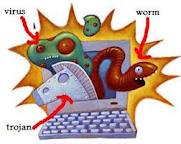 If you have not been a victim of cybercrime, you will be. Nearly two thirds of web users have already been victims.
What if you have a Mac? does this apply to you? Granted Mac users have a smaller chance of getting a virus, spyware, or malware. But, it can happen and as Mac’s become more popular they will be infected more. The reason that Macs are not infected by most of the virus, spyware, or malware out there is due to the fact that a majority of the tools and scripts used to create virus, spyware, or malware are designed for Windows based computers, and also over 80% of the worlds computers are windows based. This is a larger target base for cybercriminals. So having a Mac does not exclude you from being a victim.
Here are some tips on how to avoid getting infected and victimized;
Layer 1 – Your Computer
Make sure you have both Virus and Spyware/Malware protection installed on your computer.
Keep your protection software updated with the latest patches and make sure the version current.
Make sure that your protection software is set to update definitions automaticaly
Make sure that the web browser you are using is current and updated.
DO NOT store passwords, private, credit card, bank information on your computer.
Make sure your OS is current with patches.
Use passwords that are mixed with characters and numbers, also throw in upper case .Use over eight characters in length.
ALWAYS backup your data on a device separate from your main Hard drive. External USB/Firewire drives are very affordable right now.
Layer 2 – You
Unfortunately our curiosity is the number one cause of infections, and the people who create the viruses, spyware, and malware know this and will continue to abuse it. The people who create these viruses, spyware, or malware apps stand to make millions from their abuse and will mutate the virus, spyware, or malware based on our internet search habits.
The most common trick; while your surfing on the internet for something on “Cameron Diaz” the first site you come across you click on. Within seconds you have a pop-up window that looks like your protection program warning you that you have a virus, “would you like to correct this”. You click on the yes button and “you” actually just installed the real virus. In some cases even clicking on the No button will infect you as well. The first thing these virus, spyware, or malware apps attempt to do is disable all forms of protection. This will prevent you from removing it. Now here is the kicker, another pop-up window opens asking for you to purchase the full version or a key to activate this app to remove all the virus, spyware, or malware apps. As soon as you provided your credit card, Paypal, or bank info to this “Company”, you have been taken again.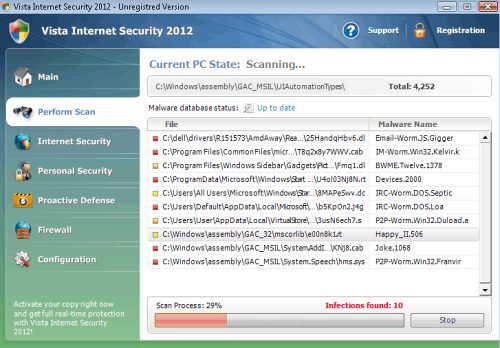
You’re probably thinking why can’t my protection program filter out bad websites? Some protection programs can, but it is almost impossible to track all the bad URL’s on the internet. A URL can change randomly and can have a different destination each time.
Avoid Porn sites (#1 cause), Dating sites, WAREZ sites (sites that contain illegally copied material offered for sale, trade, or download), Peer-to-Peer sharing sites (similar to WAREZ sites).
Be very CAUTIOUS when going to Free game sites, Facebook, Myspace, Celebrity sites, gambling sites, and sports sites.
Avoid Redirect Links. These are links that display one thing but take you to another destination. To view the true destination of a Link, hover your mouse over the link and view the actual destination in the lower portion of your browser. This may vary based on your browser or App.
Avoid opening emails that you do not recognize. Especially if the Subject refers to someone needing money, or Package delivery problems, long lost friends trying to find you, Bank transaction error, a company needs you to login to your account, etc. Use your better judgment.
Even be CAUTIOUS of email from people you know. A common propagation method of virus, spyware, or malware apps is to use the contact list of an infected computer to send itself out to everyone in the list.
When you are searching for a specific topic using a search engine, review the results before you click on them.
Layer 3 – “Virtual” Protection
Social Networking sites (Facebook, MySpace, etc)
Avoid using your primary email address for these accounts. Create a Free email account like Gmail, or Yahoo.
Don’t just “Friend” people so you can have a large number of Friends. This is how people hack your account and this can also expose all your “Friends” as well.
Avoid listing personal information in your Profile. Even your Birth date can be used against you.
Avoid using the GPS Location Feature when using Twitter, Facebook, etc. from your Cell phone. Cyber criminals can figure out daily habits and current locations with this info.
Avoid emailing passwords, credit card info, and or bank info. Your emails are not always private and protected.
DO NOT keep passwords or personal info in your Contact manager.
If you use a Gmail, Yahoo, AOL, etc. mail client change your password often. It is very common for internet based emails accounts to be hijacked. Once your account is hijack it is very difficult to recover that account.
Emails can contain virus, spyware, or malware in two forms; Attachments, and links to websites that are infected. Even picture attachments can contain a virus, spyware, or malware. Be CAUTIOUS or email attachments and links within the email. Some protection software is capable of scanning email, check your protection software for this feature.
Internet Websites
Avoid online stores that do not use SSL security. If you do not see https:// before the URL, DO NOT enter your credit card info.
If the online store asks to save your credit card info for future use, always say no. Companies are hacked for this info often.
When you asked to create a User account, and you need to create a “Secret” answer to a already provided question NEVER use your mother’s maiden name.
When you visit a website that you need to login to, DO NOT allow your browser to Save the info for future use.
Personal Websites/Domains
If you own a website(s) you may get a letter in the mail stating your “domain is due to expire” from for example; “Domain Registry of America”, it can be from other companies but this is the most common one. Ignore this letter and DO NOT submit payment. As soon as you acknowledge the letter with a payment your domain will be transferred to this company and you may even loss complete control of your domain name. Know who hosts your domain name or website to avoid this scam.
Be sure to change your FTP password often and mix letters with numbers. If your FTP account gets hacked by cybercriminals you can be locked out of your own website, and they will use your sight to transmit virus, spyware, or malware apps.
You are probably feeling overwhelmed with all this information and it may seem like way too much to watch out for. But, the burden will always be on the end user “You” because; you have the most to lose.
Recovering
Recovering your system from a virus, spyware, or malware infection can sometimes be as simple as running your protection software and clicking on the fix button, but most of the time you won’t be able to do that. It never hurts to try. Open your protection software and run a “Full scan” on your system. If it finds anything, select fix. Sometimes the protection software will want to perform a reboot to complete the corrections.
Once your system is back up, test to see if everything is the way it was. If for any reason you still think your system is infected then your protection software has been compromised by the virus, spyware, or malware app and you will need to seek help from someone who has dealt with virus, spyware, or malware apps.
The most common and quickest way for a Computer Tech to recover a system that has been infected with virus, spyware, or malware apps is to format the system and reinstall. So make sure you have the CDs that came with your computer and a Backup you can restore from.
Useful tips to help prevent damage, minimize, or recover from a virus, spyware, or malware infection.
A suspicious Pop-up window claims I have a virus: Press the ALT-F4 keys two or three times and answer yes to close whichever window is open. Shut Down your computer. Restart your computer and check to see if everything appears to be ok.
If your computer seems to be slower than normal, you may be infected or your system is damaged.
If certain programs will not open, you may be infected or your system is damaged.
If you get misc pop-ups when you open your web browser, you may be infected or your system is damaged.
If you open your web browser and you can’t seem to get on the internet, you may be infected or your system is damaged.
If you open your web browser and it goes to another site which is not your default, you may be infected or your system is damaged.
If you search the internet for something and the results come back in a search engine you are not familiar with, you may be infected or your system is damaged.
My system is infected and I can’t do anything: If you think your computer is acting weird or it’s very slow, nine times out of ten you are infected with something. Run your protection program(s) and do a Full scan of your system. If you are unable to open your protection program then you will need to seek help from someone who has dealt with virus, spyware, or malware apps. For windows users, sometimes you can boot your computer into Safe Mode and then run your protection program. All else fails we are here to help.